A meta-hommage to Duchamp-- celebrating so many levels of media and performance!
Courtesy of a tweet via one of my favourite websites, Brain Pickings
Yes, this post is now waaaaay late, but better this post be
late than the mammoth grant application I was slaving away on for the better
part of the last week (well actually all of the last few months). Somehow all of my plans to gradually put the parts of it
together over a longer stretch of time failed and I found myself sitting for
twelve hour stretches over the past week to edit and re-edit and perfect the
paperwork (any of you graduate students and academics in Canada know the
particular challenges of writing that perfect SSHRC app!). All is now finally
calming down and I am happy to share some great tweets from the past week. Ironically enough, I almost missed the Twitter blackout all together since I was so removed from my social media networks. Not so sure it was very successful anyways. With
any luck, I should FINALLY get back to some regular blogging this week—I have
some great items to share and muse over.
Do I Have to Finish My Dissertation?
Almost certainly the best review of what may be the Best
Picture: Geoffrey O’Brien on ‘The Tree of Life’
How Twitter users have responded to @Twitter's new system for withholding
tweets #twitterblackout
Are traditional colleges ready for the emerging forces
disrupting higher education?
Warhol shopping for Campbell's soup-- how meta.
Source: Flavorpill's twit pic of the day
A quiet and mostly uneventful weekend for me (at last!). I got a chance to catch up on my film-going and caught both Roman Polanski's wickedly clever Carnage, which I absolutely loved (especially as someone without kids who marvels at the inner-workings of parental subcultures) and Martin Scorsese's much hyped, but very entertaining love letter to early film, Hugo. After The Artistcleaned up at the Globes and is, by all accounts, set to do the same at the Oscars, I am quite struck by how early cinema history is really having a moment in the popular culture. It is fantastic since it helps me raise new discussion with two courses I am teaching this term which have sections related to early film history. I plan to post on this phenomena later in the week. As for Twitter, it was full tilt all week with lots of commentary about both the Globes (I thought they had Ricky Gervais pretty reigned in, no?) and the blackout day to protest SOPA. Take a break, grab a cup of coffee, and check out some of my favourite tweets from this past week:
Learning from Vuitton and With a Little
Help From Facebook, Hong Kong Designer Launches a Sell-Out Line
A brief history of personal computing,
1975-2011, in 28 animated seconds
'The Artist' is silent?! Clueless
moviegoers demand refund from theater
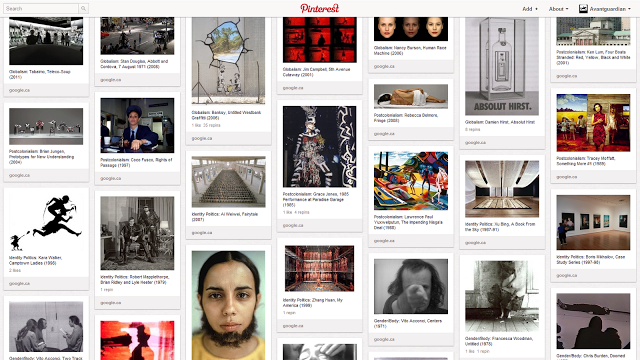
Screen grab of a Pinterest board for one of my art theory classes.
Pinterest provides users with a "virtual pinboard" to collect
and organize images/ideas found on the web.
As a kid, I always loved cutting pictures, inspiring images, artwork and design ideas out of collected magazines and then pasting them into scrapbooks or simply posting them around my bedroom. Back in that analog world of paper, glue, and white walls, the process of collage and rearrangement was rooted in a desire to make new connections and/or transform the original context of images into ones that were both personal and individually meaningful. Later in life when I began to study art history and make my own flash cards to study key works of art (in my opinion, still *the best* way to prepare for an art history exam), I was struck again by how powerful the act of collaging was to reinforce and make critical connections between visual materials.
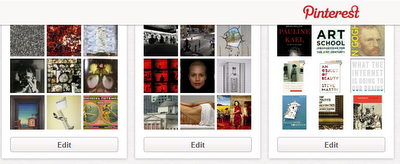
Here is a screen capture of three of my boards--
two were created for classes that I teach while the third one is
collection of books I have read and/or want to read.
In the past week, I posted about my discovery of Prezi presentations for lecture material-- an application that allows the most intuitive approach to arranging images in a kind of dynamic story-board. Along with Prezi, I have also started using another web-based application called Pinterest that takes collage and picture/idea collecting in a more hands-on and pragmatic direction. Described as a "virtual pinboard" by the creators, Pinterest allows users to collect, organize, and share found images on individually created boards which can be labeled and categorized in any way the user likes. I first began using Pinterest last summer when I was collecting images and ideas for a course proposal. Instead of traditional bookmarking or even using another of my favourite info-gathering applications Evernote (an application I blog about here), I began using Pinterest because it provided a visually appealing platform for seeing my collected images/ideas at a glance. Later on, I found Pinterest was also very useful for gathering and sharing a pinboard of favourite books and films. And last semester, I began using the application to arrange and share the art works that I had assigned in my classes to students for individual writing assignments. Students were thus able to look at the board and follow each week's presentation of featured art works while also seeing the "bigger picture" of the course.
I added a Pinterest button to the top page of my blog to direct
visitors and students to my Pinterest boards.
To create a Pinterest account, simply request an invitation on their website (it does not take long to get an account) and then make sure to also download their very useful "Pin It" button that sits on the Chrome toolbar and allows users to clip and collect images quickly (see the short "how-to" videos below). While I have yet to fully engage with the very large Pinterest community-- you can follow favourite boards, make comments on others pins, and find like-minded people who share your interests on the website-- I have added a Pinterest button at the top of my blog to allow visitors and students access to my boards. I am now working on creating more interactive pinboards to encourage others to pin images on a shared board. In this sense, the potential for this application is fantastic and I think it especially appealing for that inner-child who used to sit on the bedroom floor with a pair of scissors, a bottle of glue, and a stack of cool pictures. Creative-types, artists, and designers rejoice!
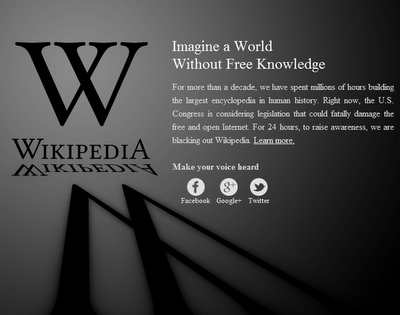
Wikipedia (English-language) will be blacked out for 24 hours starting on Wednesday, January 18th
I have a love/hate relationship with Wikipedia. As with many web applications and services that can simplify the exchange of information, Wikipedia is one of those "use at your own risk" entities that is often the source of some very bad plagiarism in the papers and assignments students submit to their professors. As I say over and over again in my classes, scroll to the bottom of any Wikipedia entry and look at the sources of the information very carefully and with a critical eye before assuming it accurate.
Even so, the collaborative on-line encyclopedia project remains very useful for quick info on the fly, a place to get a basic sense of a topic area, and a nice starting off point for sparking connections and ideas you had maybe not thought of. Bottom line, anyone in academia would be lying if they said they didn't use it.
**updated**This a screen-grab of the Wikipedia site as it appeared at midnight EST
on Wednesday, January 18th.
With all of the openness and international collaboration associated with the Wikipedia project, there have been new movements afoot to try and control just how quickly and through what channels information flows on the net. At the same time, copyright is a growing concern and Internet piracy a hot topic of debate. Still, even if there is a legitimate basis for action in some arenas, these actions also carry the serious risk of limiting current freedoms on how information is exchanged and circulated on the web. In particular, the Stop Online Piracy Act, introduced in the U.S. House of Representatives this past fall has raised many concerns. There are real questions about how freedom of speech and censorship will be addressed with an Act that attempts to limit how "foreign" websites access local publics. There is also the fear that this will be among the first of many moves to control and mediate how information and access to news and breaking world events will be dealt with. Just consider the crucial role the Internet has played in the wave of recent global and more localized protest movements, and you can see the significance of such legislation.
In a statement posted on their website, Wikipedia announced that as an act of protest against SOPA, it will black out the English-language version of their website for 24-hours on Wednesday, January 18th. At the same time, Wikipedia outlined the importance of maintaining a framework for open access and collaboration to maintain its existence:
"We depend on a legal infrastructure that
makes it possible for us to operate. And we depend on a legal infrastructure
that also allows other sites to host user-contributed material, both
information and expression. For the most part, Wikimedia projects are
organizing and summarizing and collecting the world’s knowledge. We’re putting
it in context, and showing people how to make to sense of it.
But that knowledge has to be published
somewhere for anyone to find and use it. Where it can be censored without due
process, it hurts the speaker, the public, and Wikimedia. Where you can only
speak if you have sufficient resources to fight legal challenges, or if your
views are pre-approved by someone who does, the same narrow set of ideas
already popular will continue to be all anyone has meaningful access to."
The public needs to debate these issues, and I think Wikipedia is taking a bold move to raise awareness about the ramifications of policing the Internet to such a high degree. I am also interested to see how everyday people are impacted without access to Wikipedia for a day. Could turn out to be the bigger story!
Last summer, I began rethinking the entire process of delivering visual information to my students via the traditional lecture format. Part of this reassessment had to do with my increasing usage of new media sources of information (be it through YouTube, Vimeo, and other web-based audio and visual materials). At the same time, new restrictions and questions of fair use and distribution of web-based content has sparked discussion about how best to present visual materials in the classroom context.
In the past decade, PowerPoint has won favour among most academics for creating lecture presentations. Easy to use, quick to produce, and with the added feature of facilitated upload to virtual learning environments like WebCT and Moodle, the PowerPoint is often the first choice for assembling images and other media. Still, there have always remained some complaints about the program, including the large size of the files (especially if using high resolution images); the time to upload and download files; the difficulty in easily sharing files across all computer platforms and digital devices; and the persistent issue of whether fair use is being employed if shared PowerPoint files include embedded materials from the web.
Prezi provides a highly intuitive and dynamic approach to assembling lecture presentations.
Enter Prezi. I first started hearing about this presentation tool over on ProfHacker a few years back when professors began raving about the potential uses of the new application in the classroom. It seemed to have some glitches at that time and so I did not pay attention at first. But last year, one of my student groups utilized Prezi for a dynamic discussion concerning performance art, and it was really then that I started thinking about how well suited Prezi was for my lecturing approach and style. First, Prezi is a cloud-based application, and utilizes a single "canvas" and a "story-telling" format as a starting point for every new presentation. In this way, the user is able to create a much better and more intuitive flow for a lecture, especially if they begin the class with a larger question or theme to explore. The ability to give a snapshot of the larger picture is really Prezi's biggest plus for me. Second, the presentations are dynamic in that users are able to zoom in and out of images and text without any distortion. For art historians, this is a serious bonus in terms of highlighting parts of a picture without the dreaded pixilation that occurs on a standard PowerPoint. Third, the ability to quickly and seamlessly embed visual materials, including video clips and other files, enables more fluidity between points in a lecture. See this quick video that highlights many of these features:
Finally, the question of fair use is approached in a very interesting way with Prezi. Since the presentation exists in the "cloud" with the user option to share the presentation via a private link, you are not asking others to download your Prezi with the accompanying embedded material (similar to how you view a YouTube embedded in a blog post). At the same time, it is much easier to share a Prezi since users can access it as a link from their computer, laptop, tablet, and even from their smart phone. Also, keeping in mind issues of fair use, it is very difficult to take a screen shot of a Prezi (believe me, I have tried using a number of tools both via Chrome and EverNote), which addresses some of the concerns with distributing materials beyond the classroom's educational use.
Prezi provides many options to use the application
for students and educators.
In my case, I have also purchased the Edu Pro version of Prezi which contains the message "For Educational Use Only" on all my materials and also allows me to produce Prezi's offline on a desktop application and keep my presentations private (unless I want to make them public--as in the two examples on this post). See an example of one of my Prezi's below created for an Introduction to Film Studies Course and another Prezi I assembled for information related to the Field School to Paris and Documenta that I will be part of this May/June 2012. You can also search public Prezi's here and see how many different ways an application like this can be used both inside and outside the classroom. I look forward to experimenting with Prezi over this academic term and would love to hear back from any of you (students and faculty) using Prezi about the pros and cons you have experienced.
**Note** when viewing a Prezi, you can opt to click on the arrow sign to take you to the next step (or go back) in the presentation, or you can go "rogue" as it were and zoom in and out to go directly to any part of the presentation that interests you. This is a great feature if you want to quickly access some part of the presentation right away.